Introduction
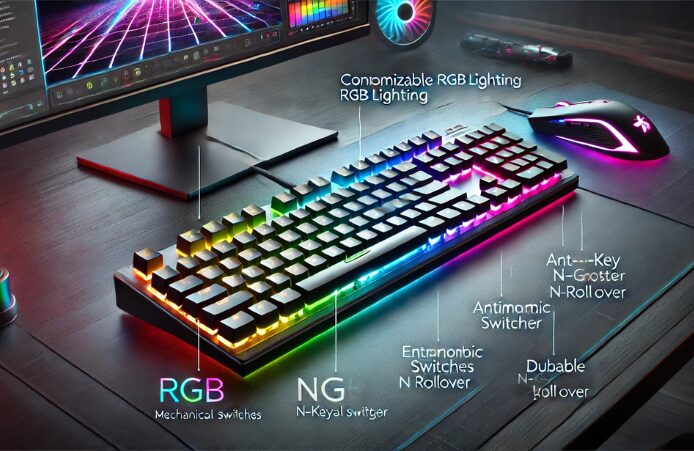
In recent years, RGB keyboards have taken the gaming and tech world by storm, becoming a staple for gamers, programmers, and enthusiasts alike. The vibrant colors, customizable lighting effects, and enhanced performance features make these keyboards not just tools but an integral part of the setup.
This article delves deep into RGB keyboards, exploring their lighting capabilities, performance, features, and tips for choosing the best one for your needs.
| Category | Details |
| Lighting | Customizable RGB backlighting with millions of color options and dynamic effects. |
| Performance | Enhanced with features like anti-ghosting, N-key rollover, and low-latency switches for gaming or typing. |
| Key Switches | Available in mechanical, membrane, or hybrid options; mechanical switches offer better tactile feedback. |
| Sizes and Layouts | Full-size, tenkeyless (TKL), or compact (60%, 65%) for different workspace needs and portability preferences. |
| Customization | Software support for creating profiles, adjusting lighting, and assigning macros. |
| Build Quality | Durable materials like aluminum frames and PBT keycaps are common in premium models. |
| Compatibility | Works with Windows, macOS, and Linux; software features may vary by OS. |
| Budget Range | Affordable options start at $30, while premium models can exceed $200. |
| Popular Brands | Razer, Logitech, Corsair, SteelSeries, HyperX, and Cooler Master. |
| Benefits | Aesthetics, better low-light visibility, improved gaming precision, and ergonomic designs. |
| Tips for Choosing | Identify your needs, set a budget, test the keyboard if possible, read reviews, and consider size/layout. |
| Maintenance | Regular cleaning, avoiding spills, and ensuring firmware/software updates. |
This table concisely summarizes key aspects to consider when choosing an RGB keyboard.
How RGB Lighting Enhances Both Aesthetics and Functionality
One of the most appealing aspects of RGB keyboards is the way they blend visual customization with practical utility. Beyond just delivering a stunning light show with millions of color combinations, RGB lighting can improve key visibility in low-light environments and help users quickly identify important keys during intense gaming or productivity sessions. By assigning specific colors or lighting effects to certain key groups, users can create personalized layouts that match their workflow or gameplay style, all while enhancing the overall look and feel of their setup. This combination of personalization, improved visibility, and immersive lighting effects makes RGB keyboards a versatile choice for gamers, creators, and everyday computer users alike.
What is an RGB Keyboard?
RGB (Red, Green, Blue) keyboards have individual LED lights under each keycap, allowing users to customize the color and lighting effects to create a visually appealing setup.

Unlike traditional keyboards, which may only have a single backlight color, RGB keyboards offer a spectrum of colors and dynamic lighting options.
How RGB Works
The RGB system combines red, green, and blue light to create various colors. By adjusting the intensity of each color, manufacturers can produce millions of color combinations. This technology allows for static colors and animated effects that can enhance your gaming or typing experience.
Benefits of RGB Keyboards
1. Aesthetic Appeal
One of the most noticeable benefits of RGB keyboards is their aesthetic appeal. The ability to customize colors and lighting effects allows users to create a setup that reflects their personality and style. RGB keyboards can transform your workspace or gaming area, whether you prefer a subtle glow or a full-on light show.
2. Enhanced Gaming Experience
RGB lighting can enhance the gaming experience in various ways. Many games utilize RGB keyboards to provide visual cues, such as changing colors when health is low or when an objective is completed. This integration can add immersion and help players react faster in critical moments.

3. Customization and Personalization
With RGB keyboards, users can fully customize their lighting profiles. Many models come with software that allows you to create unique profiles for different games or applications. This level of personalization can improve usability and make the keyboard more enjoyable.
4. Improved Visibility
In low-light conditions, RGB backlighting can improve visibility, making it easier to see the keys. This feature is particularly beneficial for gamers who play in dimly lit environments, as it ensures they can easily locate the keys without straining their eyes.
Performance Features
While RGB lighting is a significant draw, performance features are equally important when choosing a keyboard. Here are some key performance aspects to consider:
1. Switch Types
The type of switches used in a keyboard can dramatically affect its performance. RGB keyboards typically come with mechanical switches, which provide tactile feedback and durability compared to membrane switches.
Common Mechanical Switch Types:
- Cherry MX: Renowned for their reliability and performance, Cherry MX switches come in various types, including Red (linear), Brown (tactile), and Blue (clicky).
- Razer: Razer’s proprietary switches offer options tailored to different preferences and playstyles.
- Logitech: Logitech’s Romer-G switches are designed for faster response times, making them ideal for competitive gaming.
When choosing a keyboard, consider the switch type best suits your typing style and preferences.
2. Anti-ghosting and N-Key Rollover
Anti-ghosting technology ensures that multiple key presses are registered accurately, even when several keys are pressed simultaneously. This feature is crucial for gamers who may need to execute complex commands quickly.

N-key rollover allows every key to be pressed simultaneously and registered correctly. This means that the keyboard will accurately respond if you’re pressing one key or all of them.
3. Build Quality
The build quality of a keyboard affects its longevity and performance. RGB keyboards can vary widely in material Quality, so choosing one that feels sturdy and well-constructed is essential. Look for keyboards with metal backplates or high-quality plastic casings, which are often more durable.
4. Connectivity
RGB keyboards typically come in two types of connectivity: wired and wireless.
- Wired Keyboards offer a stable connection and zero latency, making them ideal for competitive gaming. They often come with USB Type-C connectors for faster data transfer.
- Wireless Keyboards: While offering more flexibility and a cleaner setup, wireless keyboards may introduce slight latency. However, technological advancements have significantly reduced this gap, and many modern wireless RGB keyboards perform exceptionally well.
Lighting Features
1. Customizable Lighting Effects
RGB keyboards often come with a variety of lighting effects, such as:
- Static Colors: Choose a single color for a uniform look.
- Breathing Effects: The keyboard gradually brightens and dims, creating a “breathing” effect.
- Wave Patterns: Colors flow across the keyboard in a wave motion.
- Reactive Effects: Keys light up when pressed, providing visual feedback.
2. Software Integration
Many RGB keyboards come with dedicated software that allows for extensive customization. This software will enable users to create complex lighting patterns, set up macros, and customize key functions.
Popular RGB Keyboard Software:
- Razer Synapse: Offers comprehensive control over Razer keyboards, including lighting effects and key assignments.
- Logitech G HUB: Allows users to customize lighting, create profiles, and manage game integrations for Logitech keyboards.
- Corsair iCUE: Corsair’s software provides advanced lighting customization and performance monitoring for their RGB keyboards.
3. Game Sync
Some RGB keyboards can sync with games to provide dynamic lighting effects based on in-game actions. This feature enhances immersion and can give players a competitive edge by visually indicating in-game events.
Tips for Choosing the Best RGB Keyboard
When choosing an RGB keyboard, start by identifying your needs—whether for gaming, typing, or a mix of both. This helps you focus on essential features. Set a budget to avoid overspending, as there are affordable options with great performance alongside high-end models with advanced features.
Test keyboards in person to assess switch type, key feel, and comfort, if possible. Research is also crucial; read reviews from reliable sources to understand performance and durability. Consider the size and layout—full-size keyboards have number pads, while tenkeyless or compact options save space and improve portability. Finally, look for a solid warranty and reliable customer support to ensure peace of mind.
Maintenance and Care
1. Cleaning
Regular cleaning is crucial for maintaining the performance and appearance of your RGB keyboard. Dust and debris can accumulate under the keys, affecting their responsiveness and cleanliness.
Cleaning Tips:
- Remove Keycaps: If your keyboard allows, carefully remove the keycaps for a thorough cleaning.
- Use Compressed Air: Blow out dust and debris from between the keys.
- Wipe Down: Use a microfiber cloth slightly dampened with isopropyl alcohol to clean the keyboard’s surface.
2. Software Updates
Keep your keyboard’s software updated to access the latest features and improvements. Manufacturers often release updates that enhance performance and compatibility.
3. Store Properly
If you plan to transport your keyboard, consider using a protective case. This can help prevent damage from spills or impacts during travel.
Conclusion
RGB keyboards combine functionality, customization, and aesthetic appeal to create an experience that is both practical and visually captivating. Whether gaming, typing, or working, the right RGB keyboard can significantly enhance your overall experience.
By understanding the lighting effects, performance features, and key attributes, you can select the best keyboard that fits your needs. With advancements in technology, RGB keyboards are becoming more affordable, durable, and customizable, making them an excellent choice for anyone looking to upgrade their typing or gaming setup.
Apart from that if you want to know about “Acer Nitro 5: Unleashing Power and Performance for Gamers and Professionals, Specifications, Pricing, and Much More” then please visit our “Tech” Category.
FAQs
A keyboard with customizable backlighting that displays millions of colors and effects.
They don’t directly improve performance but often include features like anti-ghosting and mechanical switches.
Yes, most allow you to switch off or adjust lighting.
They don’t directly improve performance but often include features like anti-ghosting and mechanical switches.
A standard backlit keyboard usually has a single color, while an RGB keyboard allows multiple colors and dynamic lighting effects that can be customized per key or zone.